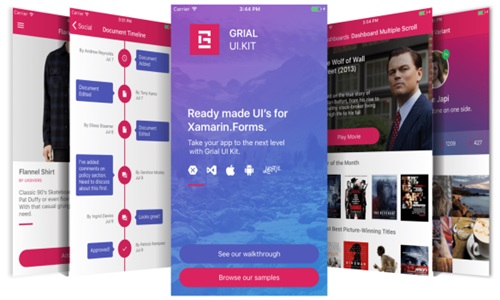
GrialKit, developed by UXDivers, is a comprehensive UI kit for Xamarin.Forms that facilitates the creation of high-quality, visually appealing, and consistent mobile applications. This toolkit provides a wide range of services and components specifically designed to enhance the Xamarin development experience. GrialKit’s offerings include pre-designed templates, customizable themes, robust UI components, and extensive documentation and support, all of which help developers streamline their workflow and deliver polished applications more efficiently.
Core Services and Features of GrialKit
-
Pre-designed Templates
GrialKit provides a vast collection of pre-designed templates that cater to various application types, including e-commerce, social networking, news, and more. These templates are crafted to adhere to both iOS and Android design guidelines, ensuring a native look and feel across platforms. Key aspects include:
Screen Layouts: GrialKit offers a multitude of screen layouts such as login screens, user profiles, settings, dashboards, and product pages. These ready-made layouts enable developers to quickly assemble the core structure of their applications.
Complex UI Patterns: Templates for complex UI patterns like master-detail views, tabbed navigation, and card views are available, facilitating the implementation of sophisticated app architectures.
-
Customizable Themes
Customization is at the heart of GrialKit. The UI kit includes a range of themes that can be tailored to match the branding and design requirements of any project. This flexibility is achieved through:
Theming Engine: GrialKit’s theming engine allows developers to modify colors, fonts, and styles globally. This ensures a consistent visual identity throughout the application.
Dark and Light Modes: Pre-built themes supporting both dark and light modes cater to modern app design trends and enhance user experience under different lighting conditions.
-
Robust UI Components
GrialKit’s library of UI components is extensive, offering everything from basic controls to advanced widgets. These components are optimized for performance and usability, covering a wide range of use cases:
Basic Controls: Buttons, labels, sliders, and toggles are provided with customizable properties to fit any design need.
Advanced Widgets: Complex components like charts, graphs, maps, and list views come with built-in functionalities and can be easily integrated into applications.
Animations and Transitions: GrialKit includes smooth animations and transitions, enhancing the interactivity and responsiveness of mobile applications.
-
Extensive Documentation and Support
A comprehensive set of resources supports the integration and utilization of GrialKit in Xamarin projects. This includes:
Detailed Documentation: GrialKit offers thorough documentation, covering all aspects of the toolkit, from basic setup to advanced customization. This helps developers understand and leverage the full potential of the UI kit.
Sample Applications: Ready-made sample applications demonstrate the implementation of various components and templates, providing practical examples and best practices.
Community and Support: Access to a vibrant community of developers using GrialKit and responsive support from UXDivers ensures that developers can get help and advice when needed.
Detailed Breakdown of Key Components
-
Navigation Components
Navigation is a critical aspect of mobile application design, and GrialKit offers several components to facilitate effective navigation patterns:
Side Menu: A customizable side menu (or drawer) that can be configured to display different sections of the app.
Tabbed Navigation: Components for creating tabbed interfaces that support both top and bottom tab bars, consistent with platform guidelines.
Navigation Bars: Customizable navigation bars that can include icons, search bars, and action buttons.
-
Data Visualization
GrialKit includes powerful data visualization tools that enable developers to present data in an engaging and informative manner:
Charts and Graphs: Line charts, bar charts, pie charts, and more are available, with customization options for colors, labels, and animations.
Data Grids: High-performance data grids support sorting, filtering, and pagination, making it easier to handle large datasets.
Maps: Integration with mapping services allows developers to include interactive maps with markers, routes, and geolocation features.
-
Form Controls
Creating forms is simplified with a range of form controls designed to enhance user input and validation:
Input Fields: Text boxes, numeric fields, date pickers, and other input types come with validation and formatting options.
Pickers: Drop-down lists, radio buttons, and checkboxes are provided for selecting options.
Validation: Built-in validation components ensure that user input meets specified criteria before submission.
-
Multimedia Components
GrialKit supports multimedia integration, allowing developers to enrich their applications with various media elements:
Image Galleries: Components for displaying image galleries with zoom, pan, and swipe functionalities.
Video Players: Integration with video playback services enables embedding and controlling video content.
Audio Players: Audio playback controls for streaming or local audio files are included.
-
Custom Animations and Interactions
Interactivity and user engagement are enhanced through a suite of custom animations and interactive elements:
Animated Buttons and Icons: Pre-built animations for buttons and icons that respond to user interactions.
Transitions: Smooth transitions between different screens and components to improve the overall user experience.
Gestures: Gesture recognition for swipe, tap, pinch, and other touch interactions.
Integration and Customization
GrialKit is designed to integrate seamlessly with Xamarin.Forms, leveraging the platform’s capabilities while providing additional functionality and customization options:
MVVM Architecture: The components and templates are compatible with the Model-View-ViewModel (MVVM) architecture, promoting clean and maintainable code.
Custom Renderers: For scenarios where default behavior needs to be overridden, GrialKit supports the creation of custom renderers.